INTERNAL CASE STUDY | Aiden for Observability

StackGen Manages Environments Across Three Clouds With Aiden for Observability

How a 4-person DevOps team eliminated multi-cloud log sprawl, cut query time by 80%, and started catching incidents before they happened — all without leaving a single chat window.

results

3→1

Observability tools consolidated

80%

Reduction in query time

2 min

AI root-cause analysis
StackGen Manages Environments Across Three Clouds With Aiden for Observability-1

Background

StackGen is an Autonomous Operations Platform that helps enterprises manage infrastructure, DevOps, and SRE workflows through AI-powered agents. The platform includes Aiden, an agentic AI assistant, and ObserveNow, a centralized observability solution for metrics, logs, and traces.

As StackGen's own customer base grew, the internal DevOps/SRE team faced the same observability challenges its platform is designed to solve. This case study documents how the team adopted Aiden for Observability to manage their own production and development environments — a true "eat your own cooking" story.

Tech stack: Multi-cloud Kubernetes across AWS, GCP, and Azure. The team manages a growing number of customer environments, including those of enterprises like Autodesk and Nielsen, and fast-growing companies like Innovaccer and InMobi, alongside 3 internal development clusters. Total environments monitored exceed the customer tenant base by roughly 50% when internal clusters are included. All managed by a 4-person DevOps/SRE team.

Challenges

Multi-Cloud Log Sprawl
Multi-Cloud Log Sprawl:


Clusters and deployments were scattered across AWS, GCP, and Azure. Each cloud provider had its own default logging solution. When an alert fired, engineers spent 5+ minutes just opening the correct cloud console and another 5–10 minutes crafting the right query to retrieve relevant logs.

Alert Noise and False Positives
Alert Noise and False Positives:


The team received a steady stream of alerts from Kubernetes clusters across three clouds. Many were outdated or no longer relevant such as alerts for nodes that had already been replaced by the autoscaler. Without a way to quickly validate alert context, every alert required manual investigation. The cognitive load was accumulating.

Maintaining the Monitoring Stack Itself
Maintaining the Monitoring Stack Itself:


Beyond the alert-response workflow, the team also carried the ongoing burden of managing the observability infrastructure as a service in its own right. Keeping Prometheus healthy across three cloud environments meant continuous work on storage tuning, retention policy management, and federation configuration, none of which is related to actual application reliability. Upgrades to the monitoring stack required the same care as a production deployment. When cardinality spiked during large deploys, Prometheus would come under memory pressure at the worst possible moment — the monitoring would become unreliable precisely when monitoring mattered most.

This was toil that had nothing to do with serving customers. It was engineering time spent keeping the lights on for the tools that were supposed to keep the lights on.

No Centralized Observability
No Centralized Observability:


Metrics, logs, and traces were siloed across different tools and cloud-specific dashboards. Engineers had to visit at least three different places: a logging solution (PromQL/LogQL), per-cloud metric dashboards, and Kubernetes clusters to piece together the full picture during an incident.

Solution

Vector (6)-3
Centralized Logging, Metrics,
and Traces with ObserveNow:


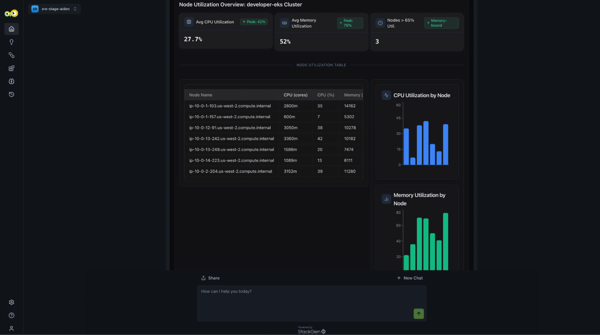
All telemetry data from every cloud provider and workload was funneled into ObserveNow, eliminating the need to jump between AWS CloudWatch, GCP Cloud Logging, and Azure Monitor. Engineers now have a single pane of glass across all environments and can check live node utilization directly in the Aiden chat window without navigating to any external dashboard.

Union-Apr-17-2026-09-54-42-5358-AM
Aiden Integration
with ObserveNow:


Aiden was integrated with ObserveNow so it can fetch dashboards and run log queries on behalf of the user. Instead of manually crafting PromQL or LogQL queries, engineers ask Aiden in natural language and get instant, correlated results across all clouds.

book-copy 1
Custom Knowledge Bases
Per Workspace:


The team used Aiden's knowledge base feature to teach the agent about correct namespaces, deployment names, and special configuration details for each workload. Each workspace has its own knowledge base, so Aiden queries the right data automatically without engineers needing to specify context on every request.

Vector (8)-2
Workspace Segregation for Governance:


The team used Aiden's workspace concept to separate development and production environments, ensuring data isolation and role-based access control (RBAC). Development workloads and their telemetry data are completely segregated from production.

Results
before after
3+ tools to check during incidents
1 unified platform: ObserveNow + Aiden
5 min just to open the right cloud console
Instant access via Aiden natural language
5–10 min to manually craft log queries
Aiden auto-runs queries using Knowledge Base
No separation of dev/prod observability
Workspace-based RBAC and data isolation
Manual context-switching across AWS, GCP, Azure
Single pane of glass across all clouds
Alert noise without automated triage
Aiden filters false alerts in seconds

Real Incidents: Aiden in Action

Incident 1: False Alert Resolved in Seconds:

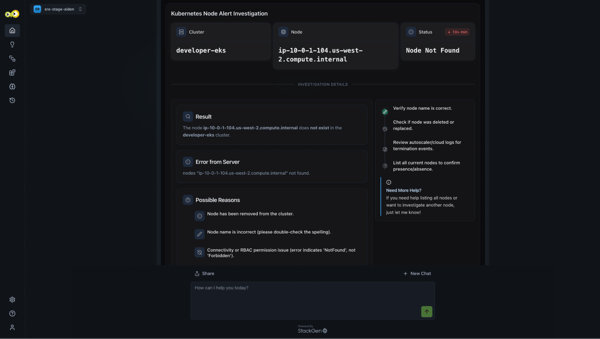
The team received the following alert from their AWS EKS cluster:

"Inside cluster developer-eks, node ip-10-0-1-104.us-west-2.compute.internal: node not ready for more than 10 minutes"

Rather than manually querying CloudWatch or the Kubernetes API, the engineer asked Aiden to investigate. Aiden determined that the node in question no longer existed, it had already been replaced by a healthy node as part of normal autoscaling. The alert was a ghost: valid when it fired, irrelevant by the time the team saw it. The engineer got a clear answer in under 30 seconds and moved on.

image1-2

Figure 1: Aiden determining that the flagged node no longer exists — alert resolved without manual investigation.

image3-1

Figure 2: Aiden surfacing live node utilization directly in the chat window — no external dashboard required.

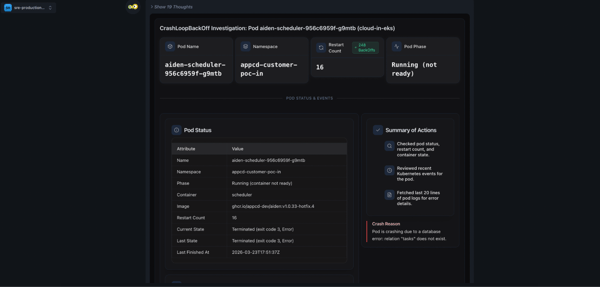
Incident 2: CrashLoopBackOff — Root Cause Found in Under 2 Minutes:

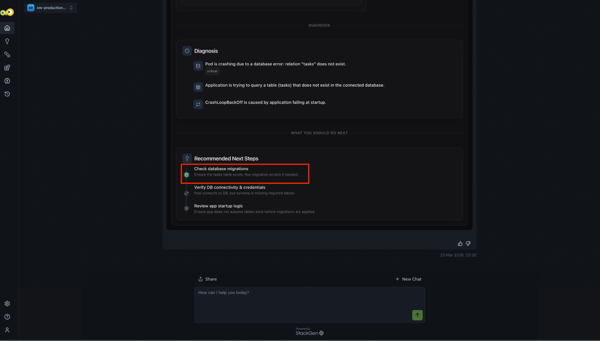
A service entered a CrashLoopBackOff state. An engineer asked Aiden to investigate. Within seconds, Aiden pulled the recent Kubernetes events for the affected pod, reviewed the pod logs for error details, and identified the likely root cause: a database migration script that had failed to complete cleanly. The engineer was pointed directly at the migration script for review, skipping the usual 10–15 minute archaeology through logs across multiple tools.

Total Aiden analysis time: under 2 minutes.

image2-3

Figure 3: Aiden pulling Kubernetes events and pod logs during CrashLoopBackOff investigation.

image4-1

Figure 4: Aiden pinpointing the database migration script as the root cause.

Incident 3: Capacity Crisis Caught 2 Hours Before Impact:

This is the story the team is most proud of and the one that best illustrates what Aiden for Observability does that traditional alerting cannot.

While Aiden was investigating an unrelated issue, it noticed a dashboard showing a combined ingestion log volume from a service growing at an unusually fast rate. Aiden calculated that, at the current ingestion rate, the persistent volume claim would be full within 2 hours at which point the service would be disrupted.

Under the traditional alerting model, the team would have received an alert with roughly 15 minutes to act once the volume threshold was crossed. Instead, Aiden surfaced the issue proactively, giving the team a 2-hour remediation window. They investigated, identified the cause, and resolved it before any customer impact.

Traditional Alerting
~15 min to act after threshold breach
Aiden for Observability
~2 hours of advance warning
Platform Capabilities Used
Group 1321319618 ObserveNow

Centralized logs, metrics, and traces from all cloud providers into a single observability layer — the foundation that makes every Aiden query possible.

Group 1321319619 Aiden Natural Language

Engineers query any log, metric, or trace in plain English. Aiden translates to PromQL/LogQL, runs the query, and returns correlated results — no manual query crafting required.

Group 1321319621 Knowledge Base

Custom per-workspace configuration guides Aiden to correct namespaces, deployments, and workload-specific details without requiring context from the engineer on every request.

Group 1321319622 Workspaces

Segregated dev and production environments with RBAC for data isolation and governance. Each environment has its own Aiden context, knowledge base, and access controls.

Group 1321319623 Proactive Analysis

Aiden doesn't wait for alerts — it surfaces anomalies and capacity risks as a byproduct of normal investigation, converting reactive on-call into proactive reliability management.

All

Start typing to search...