

Share This:
Infrastructure teams are drowning in complexity. Distributed cloud environments, multi-cluster Kubernetes deployments, and ever-growing microservices estates have made manual infrastructure management unsustainable. Two technologies are converging to fix this permanently: GitOps - the practice of using Git as the single source of truth for declarative infrastructure and AI-powered automation that eliminates human toil at every layer of the stack.
In this guide, we walk through a complete, production-ready GitOps implementation augmented with AI assistance that detects drift, enforces policy, accelerates incident recovery, and even authors infrastructure from natural language. Whether you're a Platform Engineer designing the foundation or an SRE fighting alert fatigue, this is the architecture that scales.
1. What is GitOps? (And Why AI Closes the Loop)
GitOps was formalised by Weaveworks in 2017 and has since become the de facto delivery standard for Kubernetes-native teams. According to the CNCF GitOps Working Group, over 60% of Kubernetes users now apply GitOps practices in production. The four core principles are:
- Declarative: the entire system is described in code
- Versioned and immutable: desired state is stored in Git — an append-only system with a full audit trail
- Pulled automatically: software agents pull the desired state and apply it, rather than being pushed
- Continuously reconciled: drift between desired and actual state is detected and corrected automatically
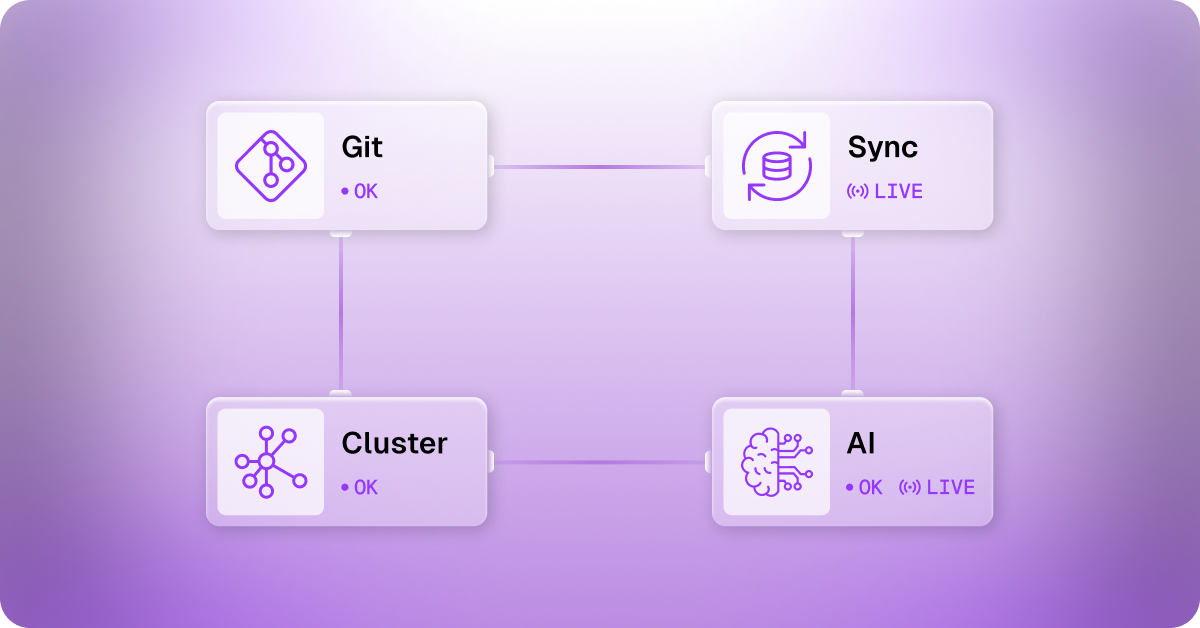 Traditional GitOps stops there. It tells you what state you want and reconciles when you diverge, but it offers no insight into why the drift occurred, cannot predict future risk, and cannot suggest remediations. That's the gap AI closes.
With AI-assisted GitOps, your pipeline gains three additional superpowers:
- Predictive drift detection: AI models learn your baseline and surface anomalies before they cause incidents
- Natural language infrastructure authoring: describe what you need, and AI generates production-ready IaC
- Autonomous remediation suggestions: when reconciliation fails, AI proposes the corrective commit
2. Core Architecture: The GitOps + AI Feedback Loop
2.1 Architecture Overview
Before diving into implementation, here's how the full system fits together. The GitOps operator continuously reconciles Git (desired state) with the cluster (actual state), while the StackGen AI layer observes runtime telemetry and feeds signals back into the Git workflow:
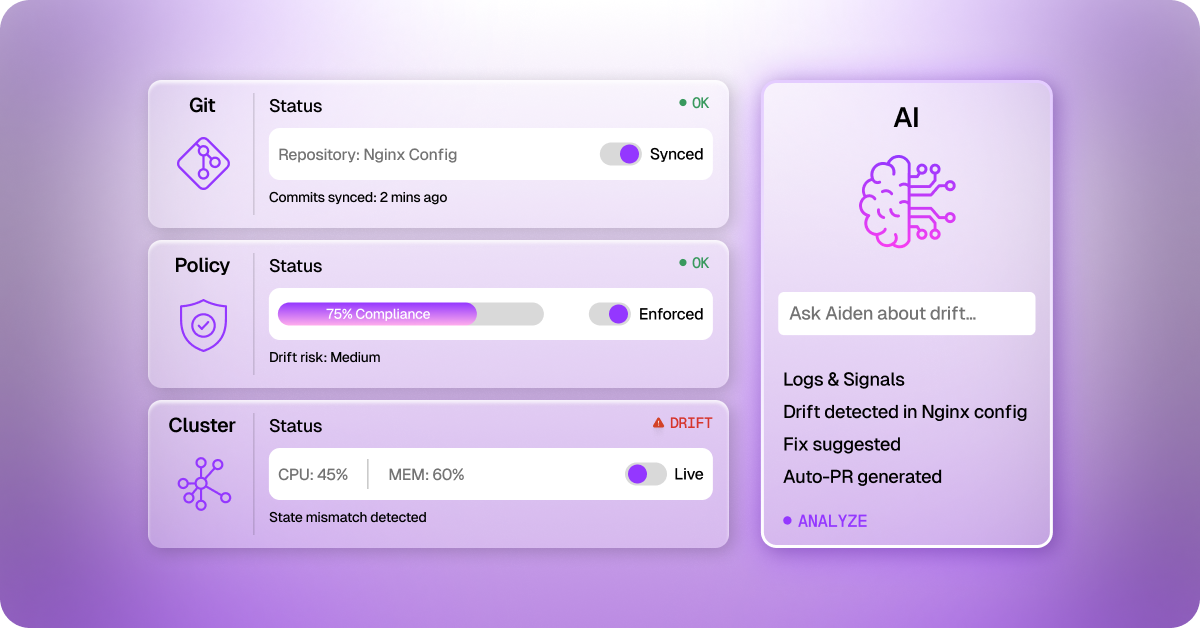 The key insight: Git remains the control plane. AI does not bypass Git — it assists the humans who operate Git, making every commit smarter and every reconciliation faster.
2.2 Choosing Your GitOps Operator
Three operators dominate the ecosystem today:
- ArgoCD — battle-tested, rich UI, RBAC, multi-cluster support. Best for teams that need visualisation of sync state
- Flux v2 — lightweight, Kubernetes-native, excellent for multi-tenant environments and GitOps-as-code patterns
2.3 Repository Structure
A GitOps repo is not a standard application repo; it is your infrastructure control plane. Here's a production-grade structure:
2.4 Where AI Plugs In
3. Step-by-Step Implementation (5 Steps)
Step 1 — Bootstrap Your GitOps Operator
We recommend Flux v2 for greenfield deployments. Install the CLI and bootstrap against your Git repository:
Step 2 — Connect StackGen AI Observability
Install the ObserveNow agent. It instruments your cluster and feeds telemetry into the AI drift detection engine:
Step 3 — Define AI Drift Rules
Create .stackgen/ai-rules.yaml in your GitOps repo to configure what Aiden monitors and alert thresholds:
Step 4 — Set Up AI-Powered Policy Gates
Before any config merges to main, run Aiden's PR Copilot as a GitHub Actions check. This catches misconfigurations, cost overruns, and policy violations before they ever reach your cluster:
Step 5 — Enable Natural Language Infrastructure Authoring
StackGen's Intent-to-Infrastructure Engine lets your engineers describe what they need in plain language. Aiden translates it into production-ready Kubernetes manifests or Terraform, complete with policy validation:
4. GitOps vs. Traditional DevOps — Direct Comparison
Here is how AI-augmented GitOps stacks up against conventional deployment workflows across the metrics engineering leaders care about most:
5. AI-Driven Drift Detection: How It Works
Configuration drift is inevitable in any live environment. A manual kubectl edit, an emergency hotfix, a misconfigured auto-scaler — and your actual state diverges from declared state. Traditional GitOps detects and reconciles this, but offers no insight into cause, risk, or future pattern.
StackGen's ObserveNow platform scores drift severity in real-time using four signals:
- Change frequency analysis — is this resource being touched more than its historical baseline?
- Historical incident correlation — has this class of change caused incidents before?
- Blast radius estimation — how many downstream services would be affected?
- Policy violation detection — does the drift break compliance rules?
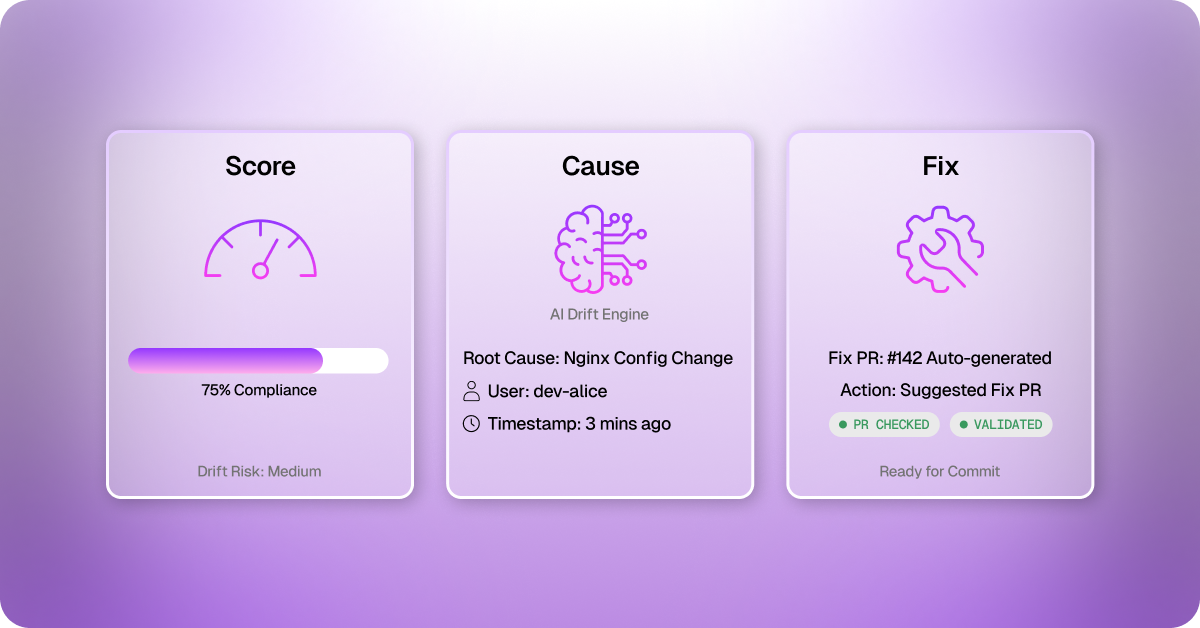 When Aiden detects significant drift, it generates a ready-to-review Git commit — the fix is already there for an engineer to approve, not just a noisy alert to investigate:
6. Security and Compliance Best Practices
6.1 Sealed Secrets — Never Commit Plain-Text
Never commit unencrypted secrets to Git. Use Sealed Secrets or External Secrets Operator to maintain GitOps purity without exposing credentials:
6.2 AI-Enforced Policy with Kyverno
Define guardrails as code. Annotate policies with stackgen.io/ai-enforce: 'true' to have Aiden scan every PR against them before they reach the admission controller:
7. Multi-Cluster GitOps at Scale
As your platform matures, you will manage GitOps across production, staging, regional replicas, and ephemeral dev environments. Two patterns keep this manageable:
7.1 Cluster-Path Repository Layout
- clusters/production/us-east-1/ — production US East
- clusters/production/eu-west-1/ — production EU West (GDPR boundary)
- clusters/staging/ — shared pre-production environment
- clusters/dev/ — ephemeral developer sandbox environments
7.2 Progressive Delivery with AI Health Gates
Use Flagger integrated with ObserveNow for canary deployments. The AI composite health score drives automatic promotion or rollback, eliminating the need for manual canary analysis:
8. Measuring Success — DORA Metrics Benchmarks
Implement GitOps with AI and track these DORA metrics from day one. Use ObserveNow's engineering intelligence dashboard to get automated weekly reports:
9. Common Pitfalls — and How to Avoid Them
- Pitfall: Treating the GitOps repo like an application repo. Fix: Keep infra and app code strictly separated.
- Pitfall: Enabling autoRemediate: true before trusting your AI rules. Fix: Run in suggest-only mode for 4 weeks first.
- Pitfall: A monolithic repo for 50+ clusters. Fix: Use the cluster-path pattern or split into app/infra repos.
- Pitfall: Committing unencrypted secrets even temporarily. Fix: Sealed Secrets or External Secrets Operator from day one.
- Pitfall: No drift score baselining before alerting. Fix: Give ObserveNow 2 weeks to learn your environment before enabling alerts.
- Pitfall: Policy gates only at admission control (post-merge). Fix: Add Aiden's pre-merge scan to every infrastructure PR.
10. Troubleshooting FAQ
The most common issues teams hit when rolling out GitOps with AI, and how to resolve them quickly.
Q: Flux is stuck in a reconciliation loop — what's wrong?
A: This usually means the cluster state cannot converge to the desired Git state due to a conflicting resource (e.g., an immutable field was changed). Run `flux get all -A` to identify the failing Kustomization, then check the event log with `kubectl describe kustomization <name> -n flux-system`. Most loop issues are resolved by deleting the conflicting resource and letting Flux recreate it from Git.
Q: ObserveNow is showing too many false-positive drift alerts. How do I tune it?
A: Lower sensitivity from high to medium in your ai-rules.yaml, or increase the maxDriftScore threshold for noisy resources (e.g., HPA, ConfigMaps with frequently rotating data). Also, ensure you have allowed the 2-week baselining period before enabling alert channels. You can add a suppressWindow field to silence alerts during known maintenance windows.
Q: Aiden generated IaC that doesn't match our internal naming conventions. Can we customise it?
A: Yes. Create a .stackgen/generation-config.yaml in your repo and specify naming patterns, label requirements, annotation standards, and preferred Helm chart versions. Aiden will apply these constraints to all generated manifests. You can also provide example manifests in .stackgen/examples/ as few-shot references.
Q: How do we handle GitOps for stateful workloads like databases?
A: Stateful workloads require extra care. Use PersistentVolumeClaims with the Retain reclaim policy so GitOps deletion events don't destroy data. Manage database schema migrations with a separate init-container or a tool like Flyway. For AI drift detection on stateful sets, increase maxDriftScore thresholds for storage-related fields to avoid spurious alerts on normal backup/resize operations.
Q: What's the recommended RBAC model for a GitOps repo?
A: Use branch protection rules on main requiring at least one approval and a passing Aiden policy gate check. For Flux itself, use Flux's multi-tenancy lockdown mode to restrict which namespaces each team can deploy to. Map Git repository access to Kubernetes service account permissions using Flux's ServiceAccount impersonation feature — this gives you a clean audit trail from Git commit to cluster change.
11. Related StackGen Resources
Continue your GitOps and AI infrastructure journey with these resources:
→ ObserveNow: AI-Powered Observability for Kubernetes
→ Aiden AI Copilot: Automate Incident Remediation
Conclusion
GitOps transformed infrastructure management by making Git the single source of truth, replacing fragile scripts with declarative, version-controlled, auditable state. Add AI to the mix, and you get a system that not only enforces your desired state but also actively learns, predicts, and heals itself.
The five implementation steps covered here, bootstrapping your operator, connecting AI observability, configuring drift rules, enabling pre-merge policy gates, and unlocking natural language IaC authoring, give you a complete, production-ready foundation. Teams that implement this stack report fewer incidents, faster recovery, cleaner audits, and most importantly, engineers who spend their time building instead of firefighting.
The 74% MTTR reduction is real. The 62% drop in deployment incidents is measurable. And the path to getting there is now a five-step implementation guide sitting in your browser.
Book a demo with our team here and reduce your MTTR!