
Shipyard by StackGen and Aiden for SRE are now available in Microsoft Marketplace, with a free-to-use plan and a paid plan for each. Azure teams can try both, then buy through the procurement path they already use.
Shipyard and Aiden for SRE support different stages of the software release process. Shipyard gives every pull request its own production-like environment, so developers and AI coding agents can test a change before it merges. Aiden for SRE takes over after the change ships: it investigates production incidents across your existing observability tools, identifies the probable root cause with evidence, and proposes a fix that a human approves.
StackGen's State of Reliability 2026 found that about 10% of disclosed company incidents are now AI-attributable, a six-fold rise in three years (research, StackGen 2026). As AI coding agents produce more code, teams need a way to validate changes before deployment and investigate issues that still reach production.
Shipyard by StackGen: a production-like environment for every pull request
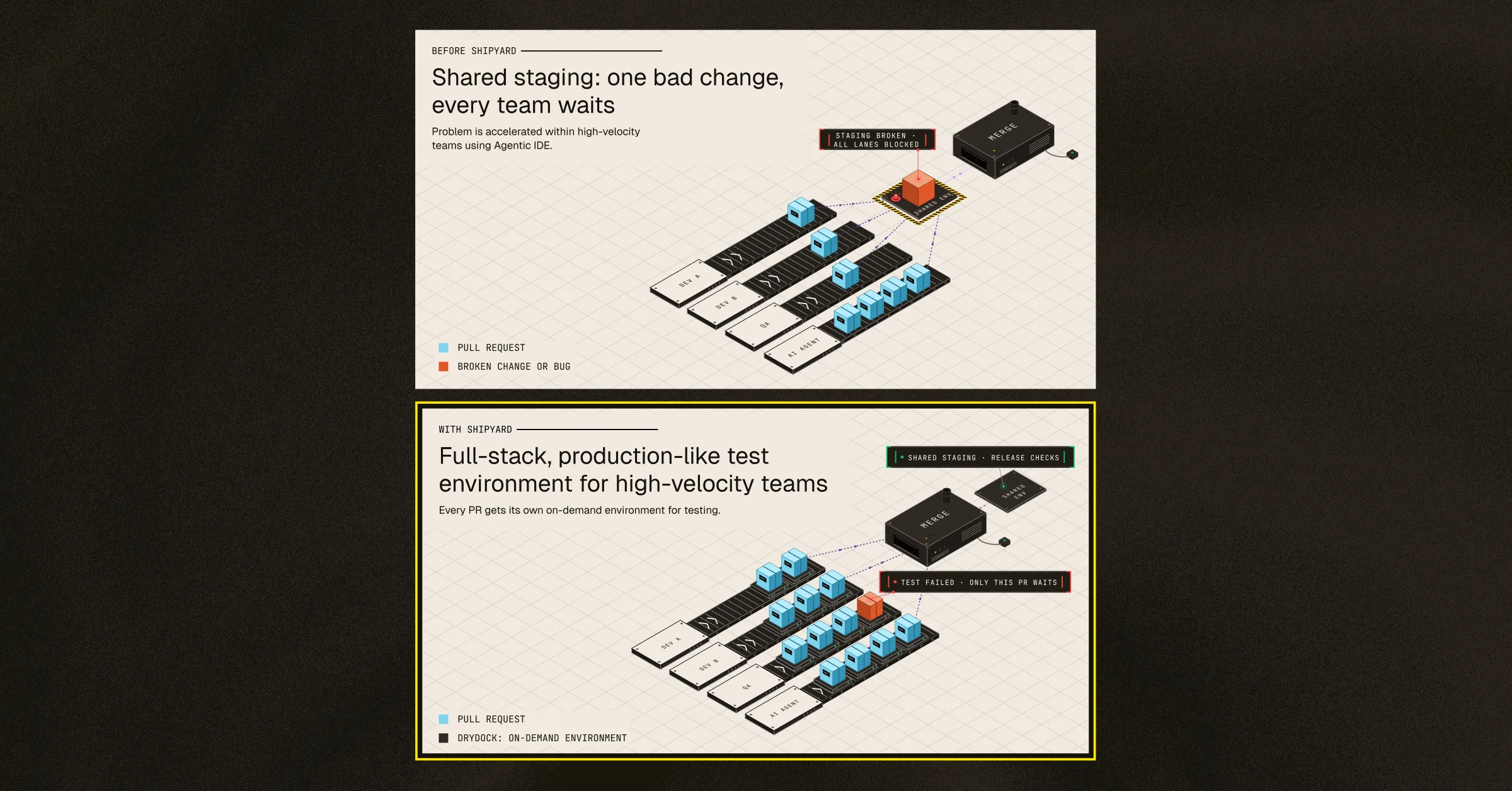
Shared staging makes developers test in a queue. When one pull request breaks staging, every other lane stops: developers, QA, and AI coding agents all wait on the same environment. Drift between staging and production lets other defects through untested.
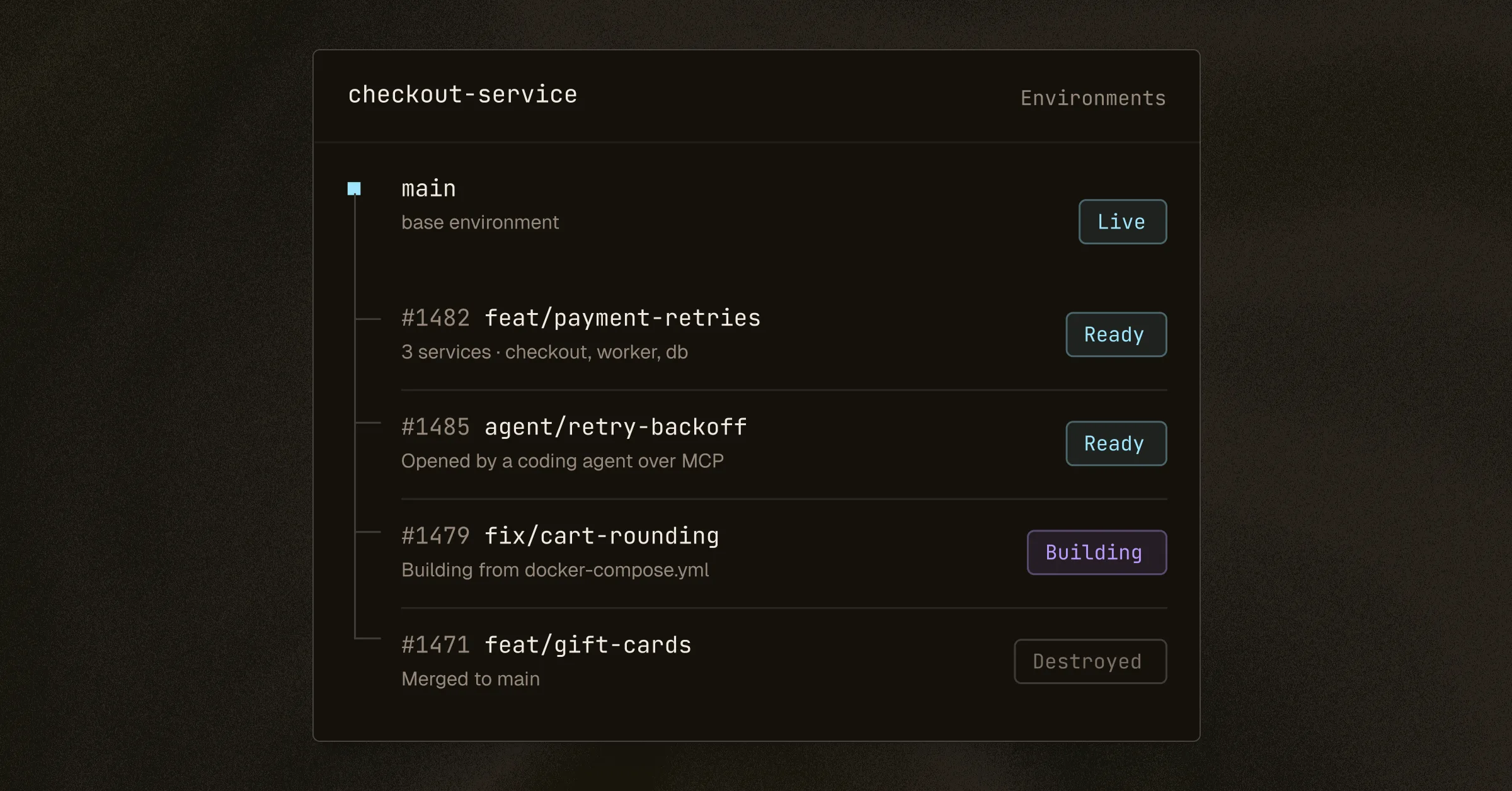
Shipyard by StackGen removes the queue. It builds a dedicated, full-stack copy of your application for each pull request from the Docker Compose file you already have. Each environment runs on its own, has its own URL, and rebuilds on every push.
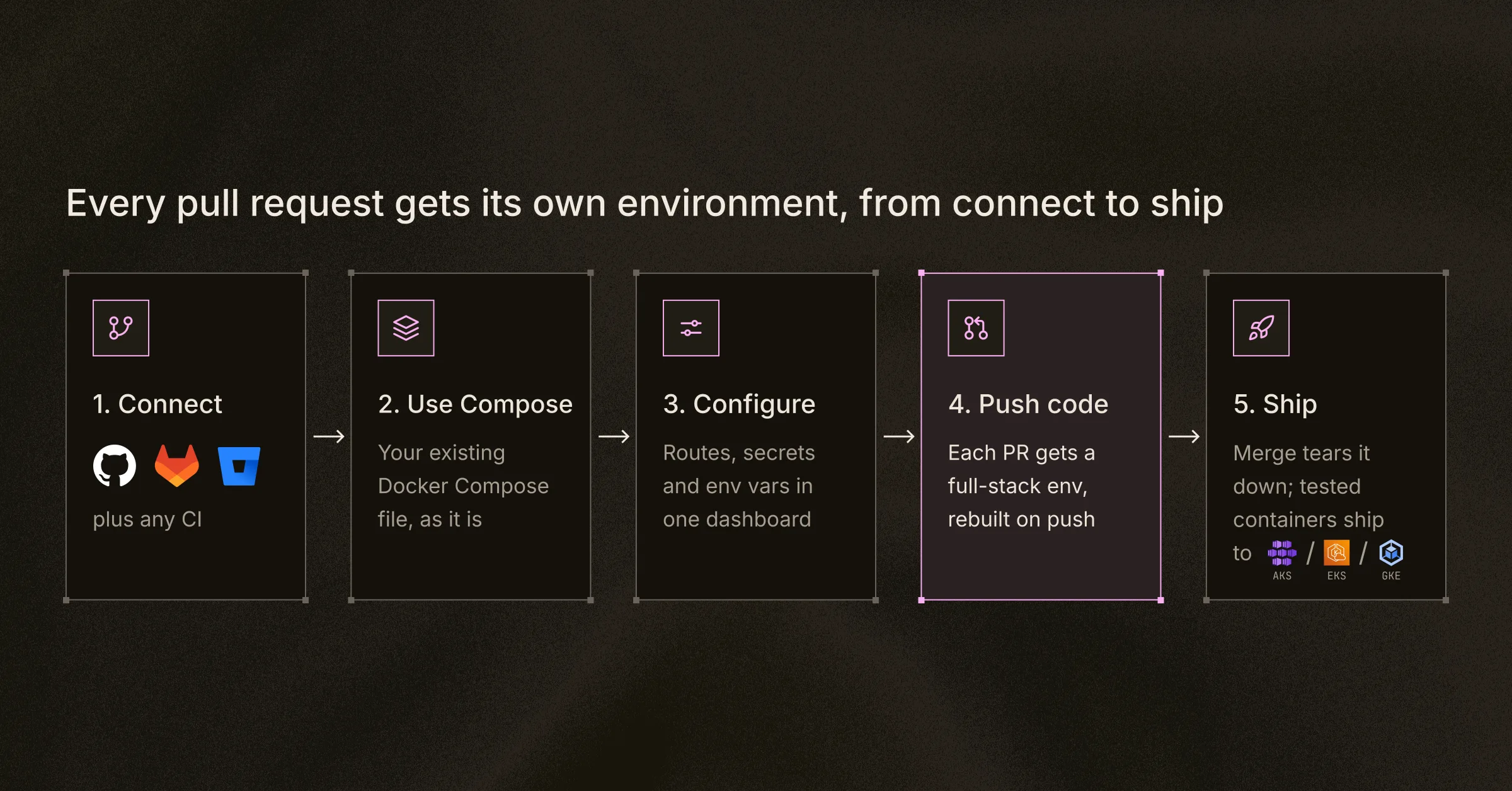
Step 4 is where the queue disappears: each pull request gets its own full-stack environment, rebuilt on every push and removed on merge.
With Shipyard, development teams can:
- Test pull requests in parallel. Each change is validated in isolation, with no contention for shared staging.
- Automate the environment lifecycle. Environments rebuild on every push and are deleted on merge, so idle infrastructure does not keep running up cloud spend.
- Stay in existing Git workflows. Connect GitHub, GitLab or Bitbucket. GitHub workflows also get commit checks and pull request comments.
- Give AI coding agents a place to test. The MCP server, CLI and REST API let compatible agents such as GitHub Copilot, Kiro, Claude Code, Codex, and Cursor read logs, rebuild environments and run tests.
- Ship to multi-cloud Kubernetes. Deploy validated containers to Azure Kubernetes Service (AKS), Amazon EKS or Google Kubernetes Engine (GKE), so one validation workflow serves Kubernetes deployments across clouds.
With Shipyard, you can test real application behavior before code reaches shared release infrastructure and catch broken changes at the pull request stage instead of in staging.
Aiden for SRE: evidence-based incident investigation with controlled remediation
A production incident rarely stays in one place. An alert reports high latency on one service, but the cause can sit in a recent deployment, a Kubernetes workload or an upstream dependency, and the evidence is spread across several monitoring tools.
Aiden for SRE investigates across the observability and operational tools you already run. It does not need a new telemetry stack. It groups related alerts, ranks them by impact on service-level objectives (SLOs), and tests likely causes against logs, metrics, traces and recent changes. At greytHR, Aiden for SRE cut incident MTTR by 50% (measured, published case study).
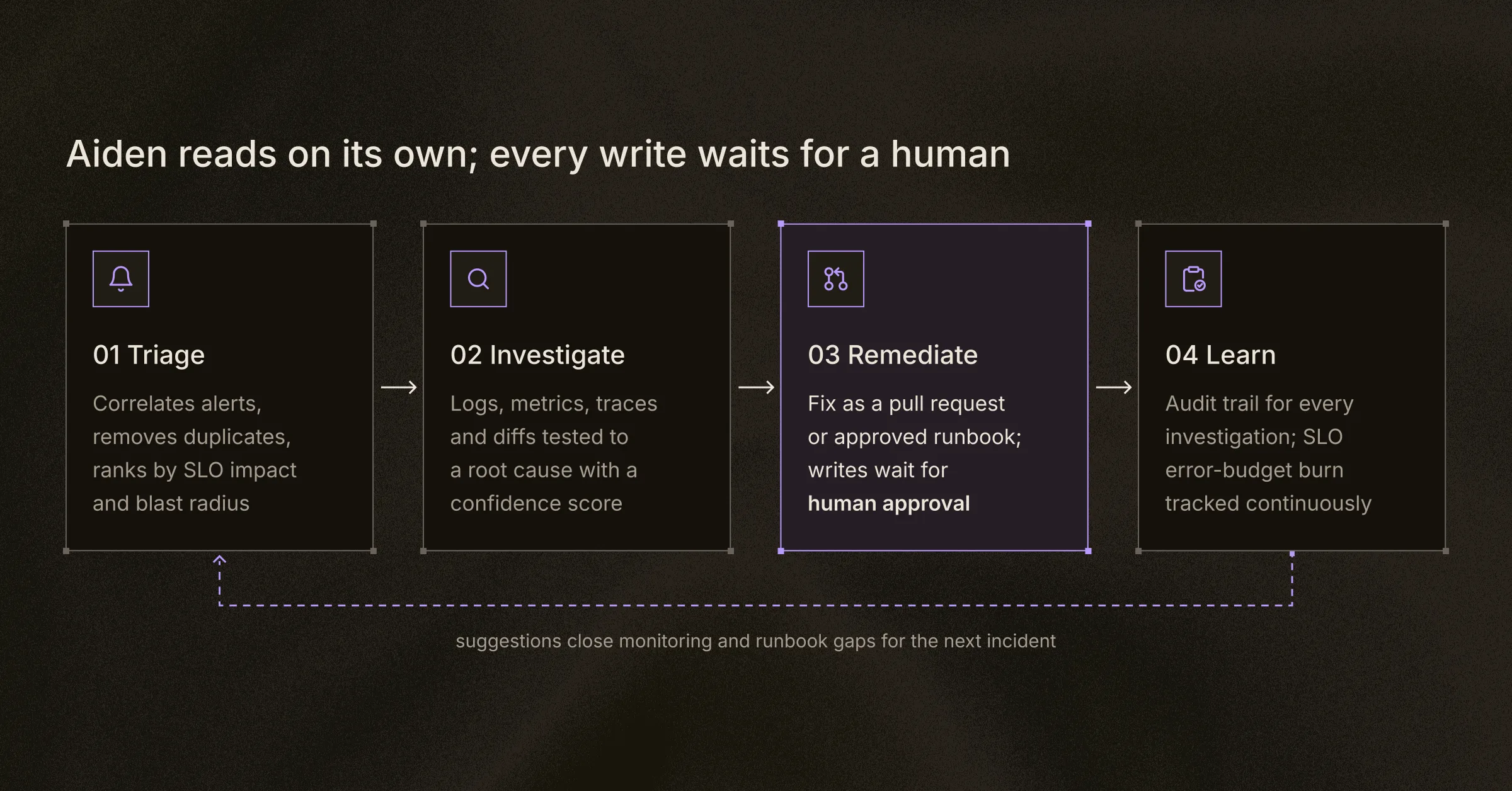
Triage and investigation run on their own. Remediation is the one gate: a fix becomes a pull request or an approved runbook only after a person signs off.
What Aiden does during an incident
table:
Capability | What Aiden does | Ask it
Alert intelligence | Turns an alert storm into one incident: one epicenter, the rest tagged as blast radius | "What needs a human review right now?"
Hypothesis testing | Tests likely causes in parallel, such as a deploy regression, secret sync or config drift | "What changed before this spike?"
Failure analysis | Loads vendor-specific analysis from the alert, for Redis, Kafka, Kubernetes, managed databases and more | "Why is Redis evicting keys?"
Governed fixes | Opens the fix as a pull request or runs an approved runbook. Reads are automatic; writes wait for you | "Roll back the last deploy and verify"
SLO protection | Ranks the queue by error budget at risk, not by alert volume | "How much error budget is left on search?"
Aiden keeps investigation separate from production change. It reads freely, but every write waits for a human, so engineers review the evidence and keep control of remediation. You can run it as managed cloud, private SaaS or self-hosted.
See Aiden for SRE at work
The screens below follow an incident on Azure from the first alert to the root cause.
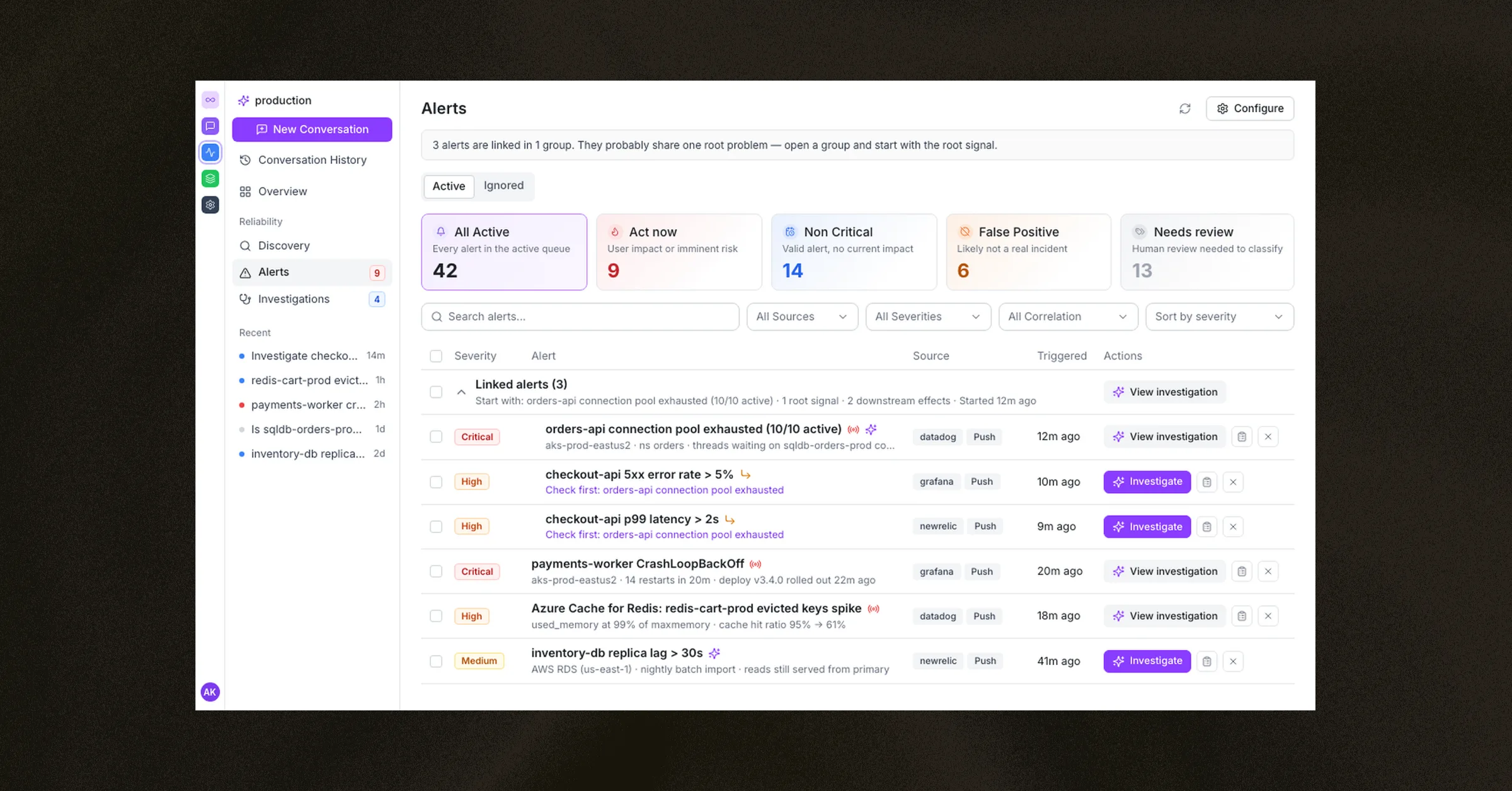
Triage alerts from Grafana, Datadog and New Relic, with related alerts linked to one root signal. Aiden brings alerts from every monitoring tool into one list and sorts them into Act now, Non Critical, False Positive and Needs review. It links related alerts into a group and points to the root signal to check first. Here, one orders-api connection-pool alert explains the checkout-api errors and latency.
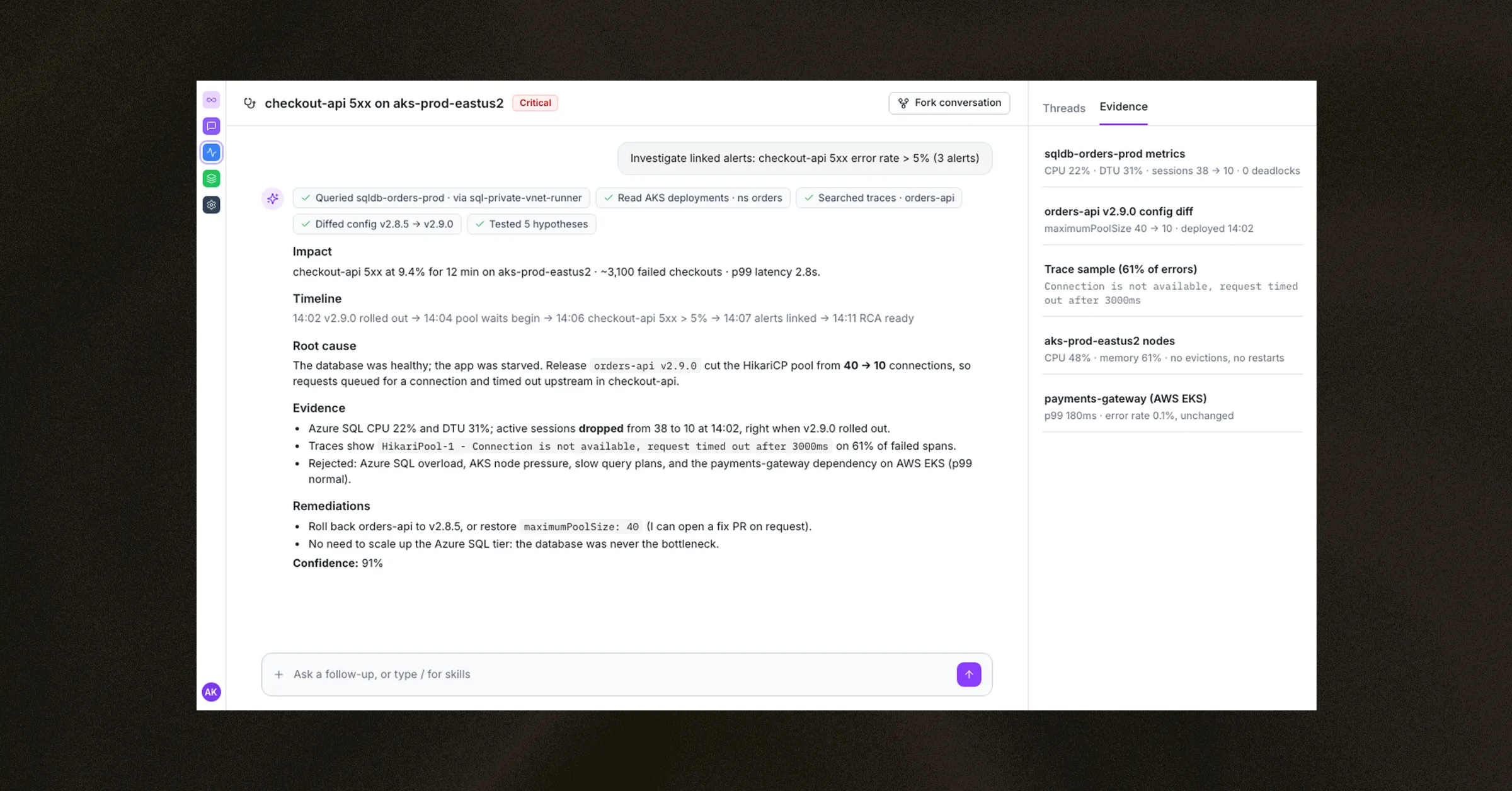
Root cause analysis for a checkout outage on AKS, with evidence from Azure SQL and AWS. Aiden investigates a checkout-api 5xx spike on AKS. It queries Azure SQL through a private runner, checks the recent release and traces, and rules out a database overload and a dependency on Amazon EKS. It returns a root cause with impact, timeline, evidence, remediation steps and a confidence score.
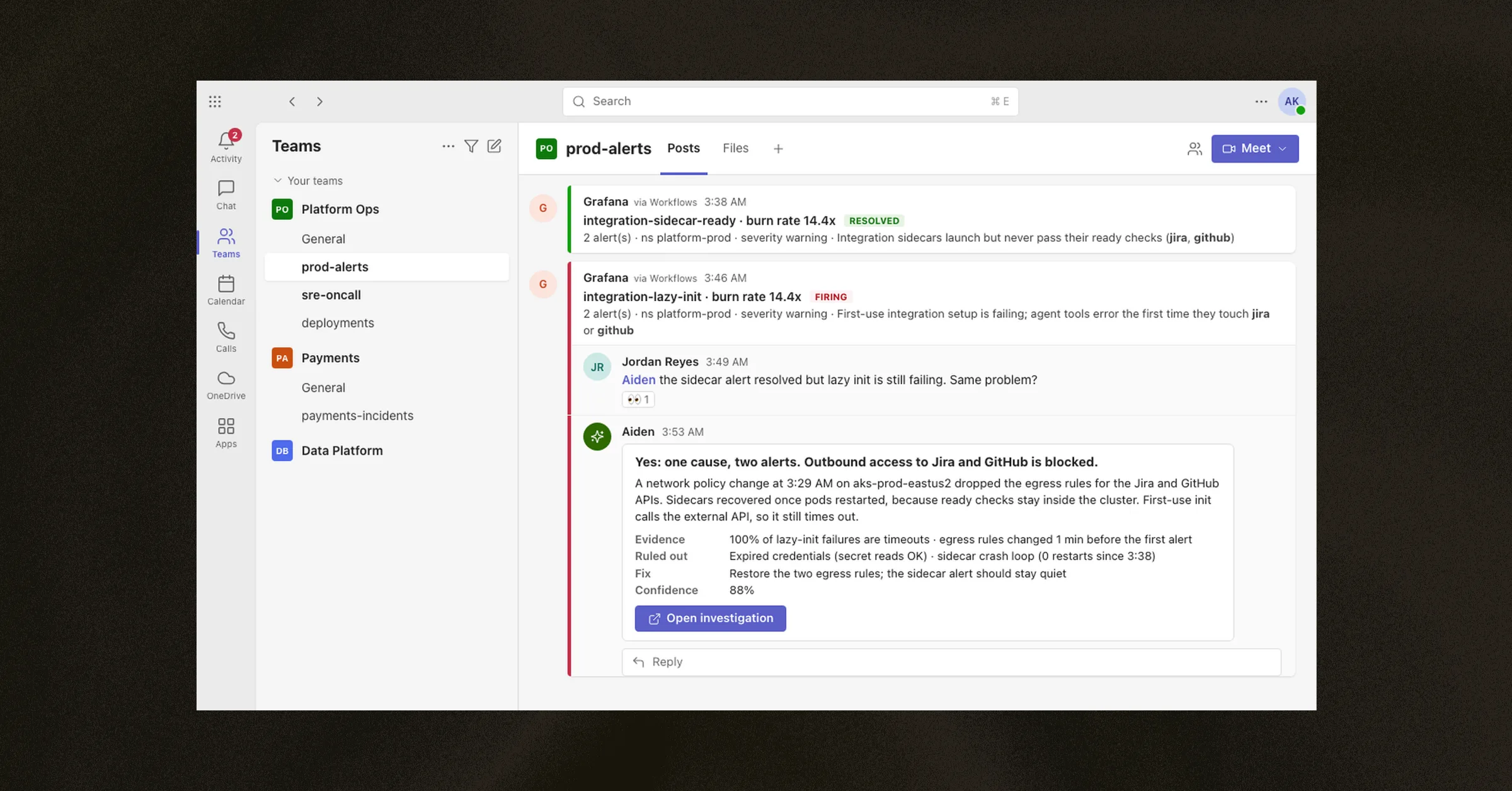
Ask Aiden in Microsoft Teams and get a root-cause summary in the alert thread. Mention Aiden in the Teams channel where your alerts post. Aiden confirms it is on it, connects two alerts to a single cause (a network policy change that blocked outbound traffic), shows the evidence and confidence, and links to the full investigation.
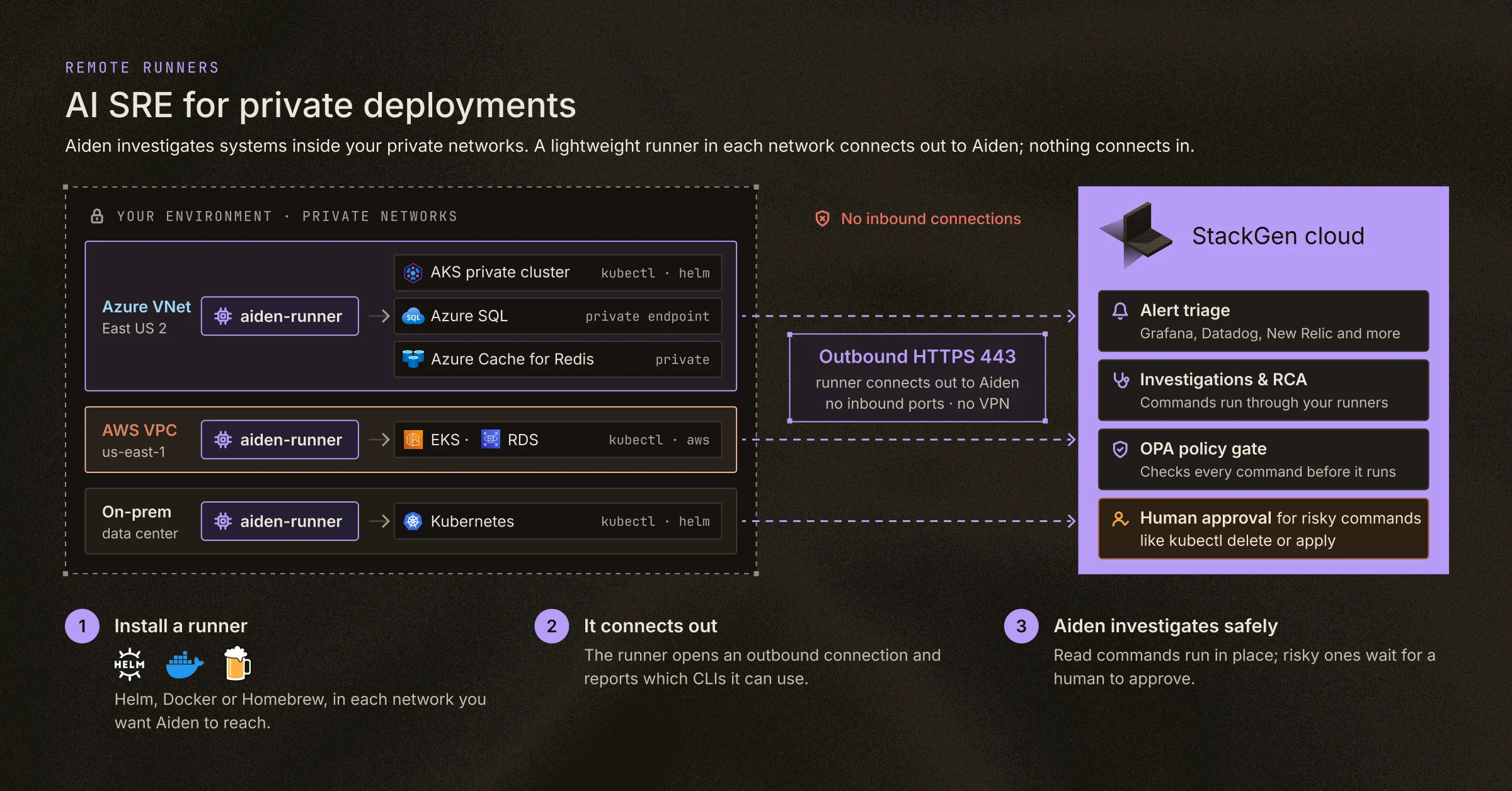
Remote runners investigate private VNets, VPCs and on-prem clusters with no inbound connections. Install a lightweight runner with Helm, Docker or Homebrew in each private network: an Azure VNet, an AWS VPC or an on-prem data center. The runner connects out to Aiden, so you open no inbound ports. An OPA policy checks every command, and risky commands such as kubectl delete or kubectl apply wait for a human to approve them.
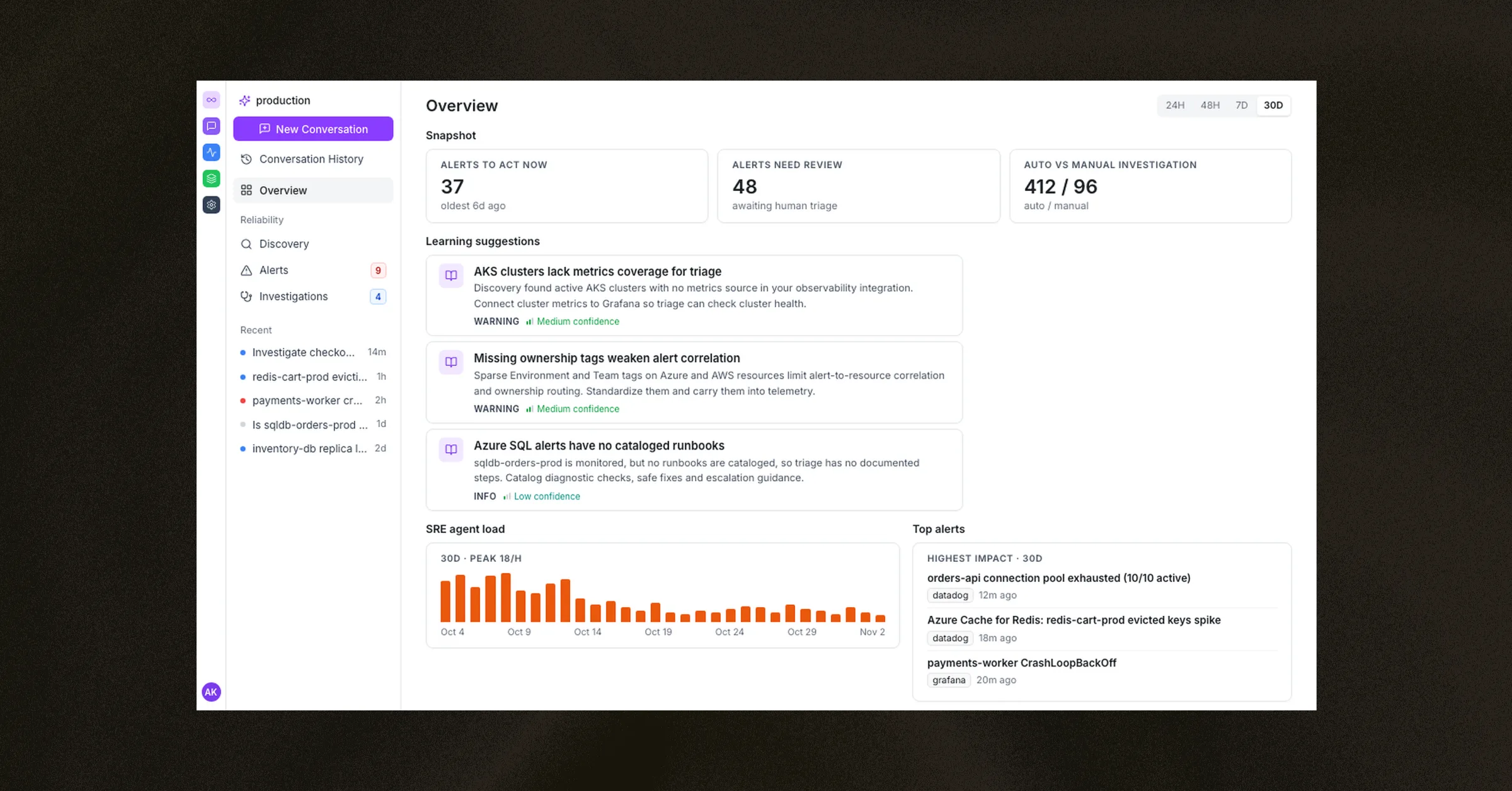
Learning suggestions that close monitoring and runbook gaps across cloud environments. The Overview page shows the alert backlog, how many investigations ran automatically versus manually, agent load and the highest-impact alerts. Aiden also suggests improvements, such as adding metrics coverage for AKS, standardizing ownership tags across environments and cataloging runbooks for Azure SQL alerts.
How Shipyard and Aiden for SRE work together
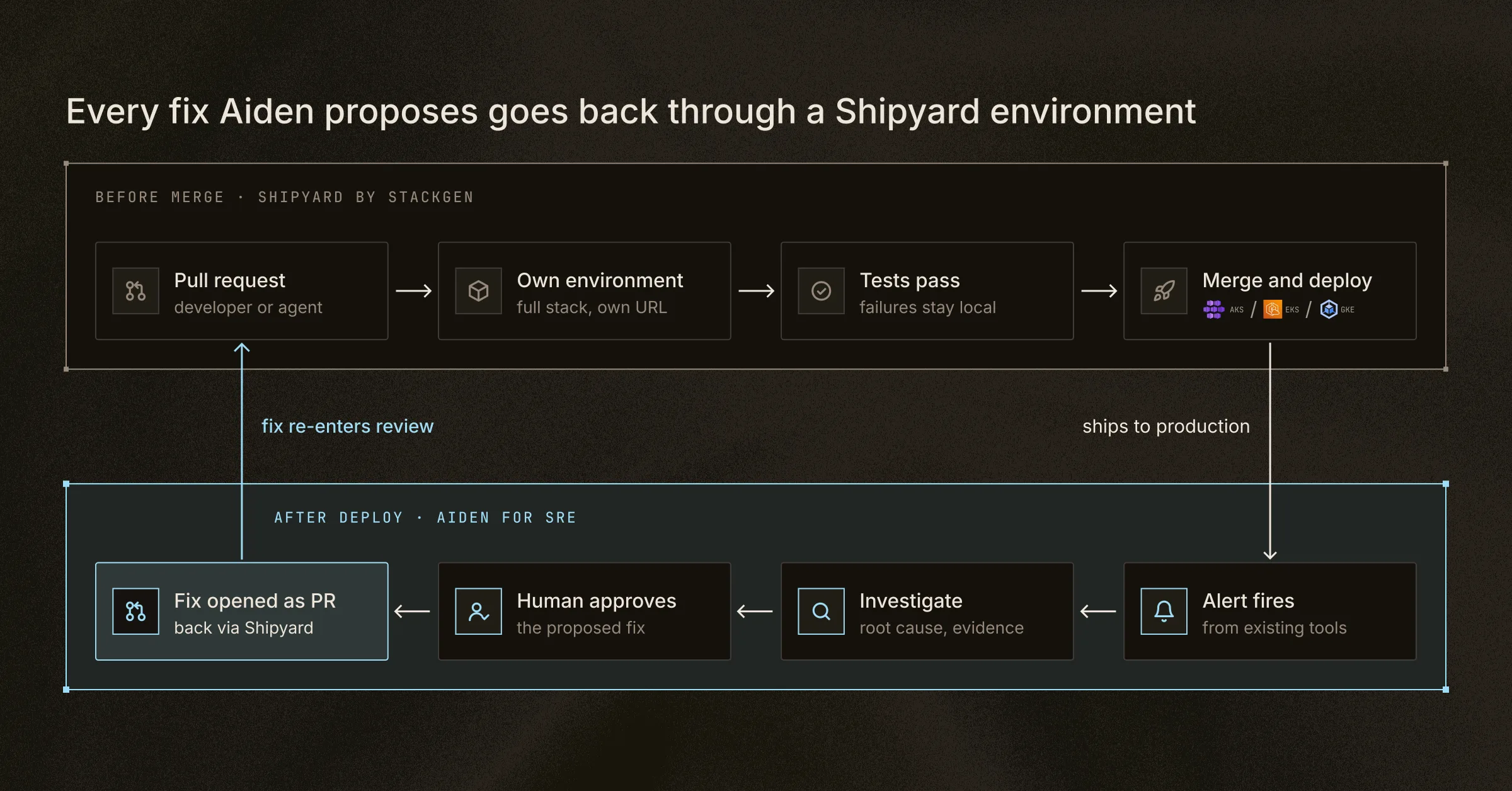
Shipyard helps you test changes in a dedicated environment before they merge, while Aiden for SRE investigates issues that arise after deployment and proposes fixes for your review. Each fix Aiden proposes arrives as a pull request, so it goes back through a Shipyard environment for validation before it ships.
Both products are part of StackGen's Autonomous Operations Factory. The Autonomous Operations Factory is a governed operating model in which specialised agents share operational context and coordinate work across provisioning, deployment, reliability and remediation, using existing tools as the system of execution.
Get started in Microsoft Marketplace
Both products have their own listing in Microsoft Marketplace:
table:
Product | Microsoft Marketplace listing | Plans
Shipyard by StackGen | [marketplace.microsoft.com/en-us/product/stackgen.shipyard-by-stackgen](https://marketplace.microsoft.com/en-us/product/stackgen.shipyard-by-stackgen) | Free to use, and paid
Aiden for SRE | [marketplace.microsoft.com/en-us/product/stackgen.aiden-for-sre](https://marketplace.microsoft.com/en-us/product/stackgen.aiden-for-sre) | Free to use, and paid
You can start with the free-to-use plan to test Shipyard on your own pull requests or Aiden for SRE on your alerts. If you decide to move to a paid plan, you can purchase it through Microsoft Marketplace using your organization's existing Azure billing and procurement process.
To see either product on your own stack first, book a demo, or learn more about StackGen and its approach to software delivery and autonomous operations.
FAQs
Is there a free version of Shipyard or Aiden for SRE in Microsoft Marketplace?
Yes. Each listing includes a free-to-use plan and a paid plan, so you can evaluate the product before you commit.
Does Aiden for SRE replace my observability tools?
No. Aiden for SRE works from the telemetry you already collect in tools such as Grafana, Datadog, and New Relic. It adds investigation and remediation on top of them.
Can Aiden for SRE change production on its own?
No. Read operations run automatically, but write operations wait for human approval. Fixes arrive as pull requests or approved runbooks, and an OPA policy checks every command.
Does Shipyard only deploy to Azure?
No. Shipyard deploys validated containers to AKS, Amazon EKS, and GKE, so one workflow covers multi-cloud Kubernetes deployments.
Can AI coding agents use Shipyard?
Yes. Agents such as GitHub Copilot, Kiro, Claude Code, Codex, and Cursor can use the Shipyard MCP server, CLI, and REST API to read logs, rebuild environments, and run tests.